Blog/How to track blockers in Slack: 3 practical methods (2026)
How to track blockers in Slack: 3 practical methods (2026)
The asyncmate team · Updated September 20, 2026 · 10 min read
A blocker mentioned in Slack usually outlives the message that reported it. Someone writes "still waiting on the API keys" at 9:40, three people see it between meetings, nobody owns it, and by tomorrow it is forty messages up in the scrollback. The blocker is still there. The message about it is gone.
So "tracking blockers in Slack" is really the problem of keeping a blocker visible for longer than the message that reported it. Teams solve it in one of three ways: a blocker question in the daily standup, a dedicated blockers channel or Slack List, or a standup bot that analyzes the answers submitted to it and keeps a running list. This page compares the three honestly, including where the simplest one is all you need.
Full disclosure: we make asyncmate, which does the third method. If you are three people in one room, method one is genuinely fine and we say so below.
Method 1: the blocker question in standup
The classic third question, asked every day in a thread or a Slack standup bot:
- What did you do yesterday?
- What will you do today?
- Anything blocking you?
It costs nothing and works on day one. Blockers surface at a predictable time, in a predictable place, and on a small team the fix often happens in the replies within the hour. If that describes your team, stop reading and go ship something.
The failure modes take a few weeks to appear. First, "no blockers" becomes the path of least resistance: typing it every day is easier than admitting the thing you have been stuck on since Tuesday, so the question goes quiet exactly when it matters. Second, a blocker that does get raised is still just a message. It is visible for one morning, then it scrolls away, and the only tracking system is the memory of whoever read it. When the same person writes the same blocker again on Thursday, it reads as a new item, not as day four of an old one. Nobody can answer the question "what is currently blocking us?" without scrolling through a week of threads.
If your blocker question has gone permanently silent, the wording is usually the problem. We collected better variants in our guide to standup questions that get real answers.
- Best for: small teams whose blockers get fixed the same day they are raised.
- Cost: free.
- Weak spot: no memory. A blocker only exists on the days someone re-types it.
Method 2: a #blockers channel or Slack List
The next step most teams try: create #blockers, and the rule is that anything blocking you goes there, not into the standup noise. Some teams add structure with a Workflow Builder form (what is blocked, who can unblock it, how urgent), and emoji conventions for state: 👀 means someone is looking, ✅ means resolved.
This is a real improvement over method one in one specific way: the channel is a list. Open #blockers, read top to bottom, and you have something like a board. Escalation gets easier too, because posting there is a deliberate act with an audience, not line three of a routine answer.
Slack Lists, available on paid Slack plans, are the structured version of the same idea: a table inside Slack where each blocker is a row with an owner, a status and a due date, and any message can be added to a list from its message menu. If your team is disciplined about maintaining state by hand, a list beats emoji conventions, because status is a field you can filter on instead of a reaction someone may or may not have added. What Lists do not change is the "by hand" part: a human still has to add each blocker, update its status and archive the fixed ones.
The decay pattern is just as predictable. The channel depends entirely on people maintaining state by hand: whoever fixed the thing has to remember to go back and add the ✅, and whoever posted it has to remember to delete or update it when the situation changes. Nobody does this reliably, so after a month the channel is a graveyard where resolved and live blockers look identical, and reading it tells you less than asking around. There is also a duplication tax: people who already wrote the blocker in their standup answer will not post it a second time in another channel, so the channel captures the loud blockers and misses the quiet ones.
- Best for: teams with a real escalation culture and someone who actually gardens the channel.
- Cost: free, plus the discipline of keeping statuses current by hand.
- Weak spot: state is manual. The channel or list drifts into a mix of fixed, stale and live items nobody trusts.
Method 3: an automated blocker tracker
The observation behind the third method: your standup answers already contain the blockers. What is missing is not another place to report them, it is memory. So a standup bot analyzes each answer submitted to it, pulls out the blocker if there is one, and keeps a ledger: this blocker, this owner, first seen Monday, mentioned again Thursday, still open, four days old. The same problem written twice is one blocker aging, not two mentions scrolling by.
Because the ledger knows what is open, it can do the things a channel cannot do for itself. It can show a board of live blockers with their age. It can flag that the same dependency has now blocked three different people this month. It can nudge the owner of a week-old blocker and ask "still blocked, or did this get fixed?", which is how resolved items actually leave the list without anyone gardening a channel.
The trades are real. You need a standup running for there to be answers to analyze, and the bot sees only what people submit to it: the rest of your Slack, channels and DMs included, is not part of the system. And extraction is a judgment call a machine sometimes gets wrong: "not blocked anymore" and "Sarah is blocked on the review" are easy for a human and easy for software to fumble, so you want a one-click way to mark something as not a blocker.
- Best for: teams where blockers repeat, span days, or need to be visible to a lead who cannot read every thread.
- Cost: bundled with a paid standup bot, typically a few dollars per person.
- Weak spot: needs a running standup, and extraction needs a human correction button.
The three methods side by side
| Method | Best for | Memory | Team friction | Who maintains it |
|---|---|---|---|---|
| Standup question | Same-day fixes | None, blockers live in scrollback | None | Nobody |
| Channel or Slack List | Escalation culture | The channel or list, if gardened | Posting twice, updating statuses | A diligent human |
| Automated tracker | Multi-day, repeating blockers | Automatic, with age and status | None beyond the standup | The bot, with human corrections |
Which method should you choose?
You are a team of three and blockers die within hours. The standup question is enough. A tracking system for problems that outlive it by a day would be overhead.
Your blockers involve other teams and need escalation. A #blockers channel or a Slack List earns its keep, but appoint an owner who prunes it weekly. An ungardened blockers channel is worse than none, because it looks like tracking and is not.
Your retros keep rediscovering the same blocker, or a lead keeps asking "what are we stuck on?" That is the job of an automated tracker. The signal that you need method three is repetition: the same blocker surfacing twice, or the question "what is blocking us right now?" having no answer anyone trusts.
How asyncmate tracks blockers in Slack
asyncmate's blocker tracking is method three, built out; it ships as part of the AI digest. The standup runs as usual, with the blocker question marked as such. The AI reads only the answers people submit to that standup, nothing else in your workspace: no channels, no DMs, no message history. From those answers it extracts real blockers and matches each one against what is already open, so the digest that lands in your channel says "waiting on infra for the deploy key, fourth day" instead of treating Thursday's mention as news.
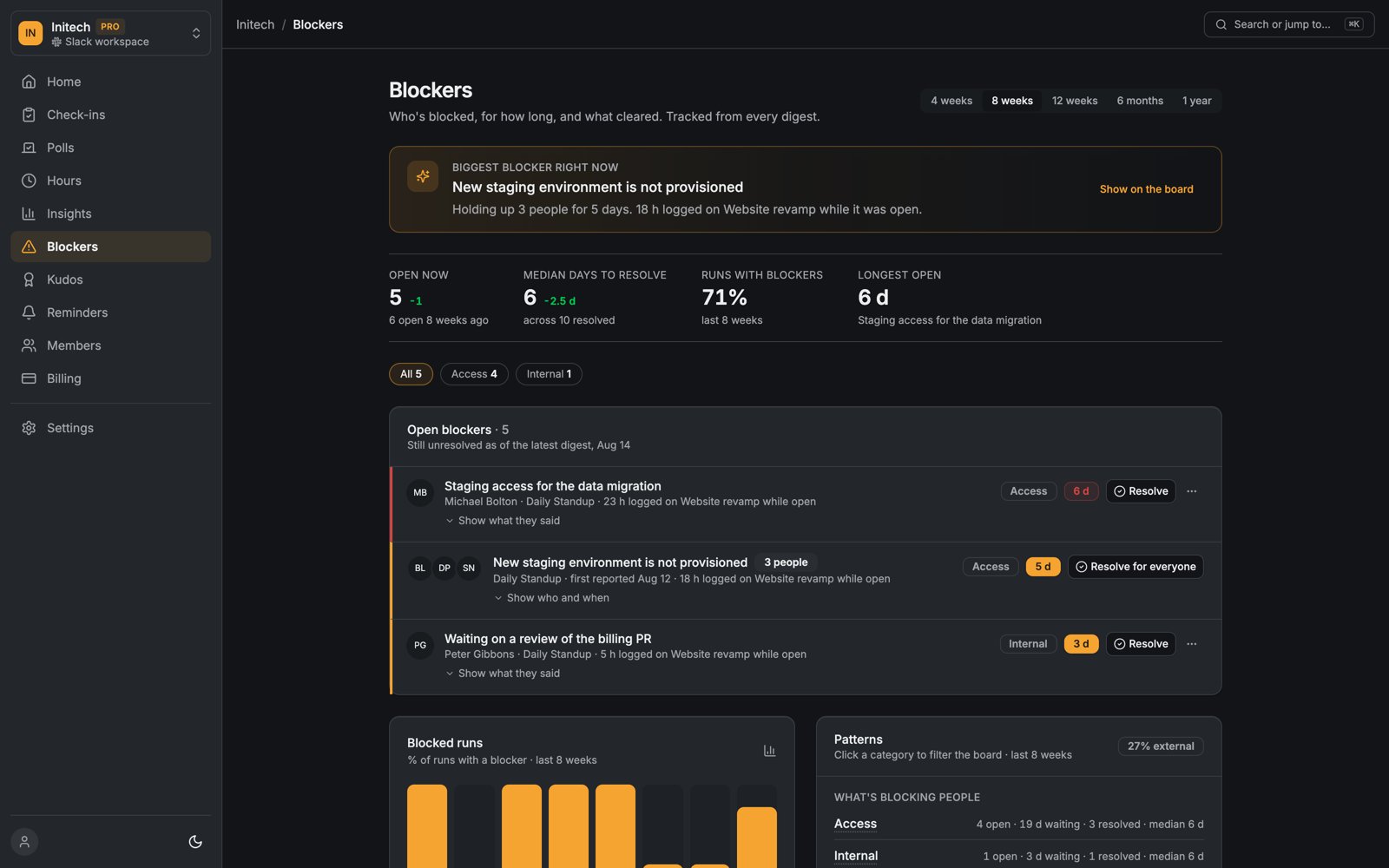
Open blockers live on a board in the dashboard: the person's own words as a quote, a category, the age, and how many runs it has appeared in. Resolving takes one click, with an optional estimate of the hours it cost. Marking a false positive as "not a blocker" is one click too, with an undo. When a blocker crosses five days, the owner gets a quiet DM with two buttons, "Still blocked" and "Resolved", which is how stale items leave the board without a human gardener. Leads get a Monday brief in a DM with the open list and the same one-click actions.
One blocker, followed for a week
Here is what that looks like on the demo workspace in the screenshot. On Tuesday three people write some version of "still no staging environment" in their standup. A channel would show three separate complaints. The ledger shows one blocker, "New staging environment is not provisioned", with three people attached and a first-reported date. On Wednesday and Thursday the same people mention it again; the blocker does not multiply, its age goes from one day to three. By the following Monday it is five days old, it has held up three people, and 18 hours were logged on the project it blocks. That single line, "holding up 3 people for 5 days, 18 h logged while it was open", is the one a lead can forward to whoever owns the environment. Nobody wrote it; it is what the standup answers already said, added up.
The numbers above the list do the same job for the team as a whole: five blockers open now against six eight weeks ago, a median of six days to resolve, and 71 percent of standup runs containing at least one blocker. The category filter shows that four of the five open items are access problems, which is a different conversation from "people are slow".
If your team also logs hours in Slack, the board connects the two: hours logged on a project while its blocker was open, which turns "we were blocked a lot" into a number you can put in front of whoever controls the dependency.
The standup itself, blocker question included, runs on the free plan for up to 10 people who answer. The AI extraction, the board and the briefs are part of Pro, and during the launch offer everything is free until November 1, 2026.
FAQ
Does Slack have a built-in way to track blockers? Not a dedicated one. Slack Lists, on paid plans, can hold items with owners and statuses, and Workflow Builder can collect structured reports, so you can build a manual system out of Slack's own parts. What Slack does not do is identify blockers from what people write or keep the statuses current: a human still has to add every item and update it by hand.
What counts as a blocker? Anything that stops your work and that you cannot fix alone: a missing review, an unanswered decision, access you have not been granted, a dependency on another team. "Hard task" is not a blocker. "Cannot proceed until someone else acts" is.
How do I get people to actually report blockers? Ask a specific question ("Is anything slowing you down or waiting on someone else?" beats "Any blockers?"), respond visibly when someone reports one, and never let a reported blocker disappear without a resolution. People stop reporting the moment reporting stops producing action.
How long should a blocker stay open before escalating? For most teams, anything older than two or three days deserves a direct conversation with the person who can remove it. The failure mode is not late escalation, it is that nobody notices the age at all, because each mention looks new. That is the main thing a ledger fixes: age is visible by default.
Can I track blockers in Slack for free?
Yes: the standup question and the #blockers channel are free forever (Slack Lists need a paid Slack plan), and they are enough for a small team with same-day fixes. What you cannot get for free is automatic state, so budget an hour a week of someone's attention for gardening, or use a bot that keeps the list for you.