Blog/How to create a poll in Slack: 4 methods compared (2026)
How to create a poll in Slack: 4 methods compared (2026)
The asyncmate team · Updated August 15, 2026 · 10 min read
Slack has no poll button, and as of August 2026 that is still true: the platform's recent releases were Slackbot AI, Lists and Canvas, and none of them counts votes. Slack's own help article offers two routes: put emoji reactions on a message, or install a polling app. In practice teams use four methods: emoji reactions, a Workflow Builder form, a dedicated polling app, or an anonymous survey when the question is sensitive. For "pizza or sushi", reactions are enough. For one vote per person, a recurring vote or an anonymous one, you want an app. The trade-offs are below.
Full disclosure: we make asyncmate, which is method three. If your questions are small and public, method one is genuinely fine and we say so.
Method 1: an emoji reaction poll (no app needed)
The zero-install version, and the one Slack itself suggests first. Post a message listing the options, give each option an emoji, then add each of those emoji as a reaction to your own message. That last step matters: it seeds the buttons, so voting is a single tap instead of a trip through the emoji picker.
Where should we do the offsite?
🇩🇪 Berlin
🇵🇹 Lisbon
🏠 Stay remote
Tap a reaction to vote. One vote each, honor system.
Copy that, swap the question, done. It is free on every Slack plan, needs no approval from anyone, and for a lunch order it is the correct amount of technology.
The limits are structural. Every vote is public, and nothing stops anyone voting for every option, so "one vote each" really is an honor system. Your own seed reactions count in the tally, so the real number is always one less than Slack shows. Past four or five options the message gets unwieldy, there is no way to close the poll, and the whole thing scrolls away with the conversation. Reactions are a show of hands, not a ballot.
- Best for: quick, public, low-stakes preferences: lunch, meeting time, an emoji-worthy either-or.
- Cost: free.
- Weak spot: public votes, multiple votes per person, and the seed votes skew the count.
Method 2: a Slack Workflow Builder form
Workflow Builder, included in paid Slack plans, can put a form behind a button or a schedule: a question, a dropdown of options, and a destination for the answers. Teams use it for recurring structured asks, "which day suits you for the release review" every sprint, with responses posted to a channel or collected in a sheet.
What you get is a form, not a poll. Responses arrive one by one with the responder's name attached; there is no tally, no bar chart, and no message that updates as votes land. Someone still counts. It shines when the recurring part matters more than the counting part, and when you were going to put the answers in a spreadsheet anyway.
- Best for: recurring structured questions on a paid plan, where a spreadsheet is an acceptable results screen.
- Cost: included in paid Slack plans; not available on the free plan.
- Weak spot: no tally and no anonymity. It collects answers, it does not count them.
Method 3: a dedicated Slack polling app
The app route fixes what reactions cannot: one vote per person, a live tally rendered in the message itself, an option to close the poll, and settings for anonymity and recurrence. Polly, Simple Poll and asyncmate all work this way: you type a slash command or fill a short form, the app posts the poll, and people vote with a tap.
Whichever app you pick, the poll itself is one slash command:
/poll "Where should we do the offsite?" "Berlin" "Lisbon" "Stay remote"        ← Simple Poll
/polly "Where should we do the offsite?" "Berlin" "Lisbon" "Stay remote"       ← Polly
/asyncmate poll Where should we do the offsite? | Berlin | Lisbon | Stay remote
Two costs come with it. First, installation: an app has to be added to the workspace, and in most companies that means an admin's approval, which is a real hurdle if polls are all you wanted. Second, pricing: polling apps typically bill the person who creates polls or cap the free tier by responses per month, so the price appears exactly when the team starts using it. The models differ more than the marketing suggests (numbers checked August 2026, from each app's own pricing page):
| App | Free tier | Anonymous polls | Paid entry |
|---|---|---|---|
| Polly | 25 responses/month | Paid only (Pro) | $19/mo per creator licence; anonymity from $29/mo |
| Simple Poll | 100 responses/month | Free | $49/mo per workspace, rising with workspace size |
| asyncmate | Unlimited polls and voters | Pro | Polls stay free on every plan; Pro adds anonymity |
Worth noting: Polly bills per poll creator, Simple Poll bills the whole workspace in size bands, and asyncmate's polls are free on every plan, with no creator licence and no cap on voters, because polls are not the thing we sell. We compare all of these app by app, Geekbot's poll add-on included, in the best Slack poll and survey apps roundup.
- Best for: real decisions, recurring votes, and anything that needs one vote per person.
- Cost: varies by app: creator licences or capped free tiers are common. asyncmate polls are free.
- Weak spot: needs installing, and in most workspaces that means asking an admin.
Method 4: an anonymous poll or survey
Some questions only get honest answers without a name attached: workload, morale, how the last release actually went. For those, a public tally is the wrong instrument no matter how good the poll UX is.
There are two levels of protection, and they are worth telling apart. An anonymous poll detaches names from votes: the tally is visible, who picked what is not. That is enough for "should we change the meeting time". An anonymous survey goes further and withholds results until enough people have answered that no single response can be picked out, which is what you want for feedback about people and workload, where "anonymous" with three respondents is not anonymous at all. The full playbook, from when anonymity helps to what to do with the results, is in our guide to anonymous employee surveys in Slack.
The free version of this method is an external form, a Google Form linked in the channel. It works, with two catches: whether it is actually anonymous depends on the form's settings (a form collecting email addresses is a survey with extra steps), and the results live outside Slack, so someone has to remember to share them back. If you install an app instead, check what it can read before trusting it with sensitive questions; our permissions guide explains what each Slack scope actually grants.
- Best for: feedback where a public answer would be a diplomatic one.
- Cost: external forms are free; in-app anonymity varies. Simple Poll includes it free, Polly gates it behind Pro at $29/mo, asyncmate puts it on Pro (checked August 2026).
- Weak spot: anonymity is a property of how the tool stores identity, not a checkbox label. Verify it.
The four methods side by side
| Method | Cost | Anonymous | Recurring | Needs install |
|---|---|---|---|---|
| Emoji reactions | Free | No | No | No |
| Workflow Builder form | Paid Slack plans | No | Yes | No |
| Polling app | Varies; asyncmate free | Optional | Yes | Yes, admin approval |
| External form or survey | Often free | Depends on settings | Manual | No |
Need one vote per person without paying for poll creators or voters? Create a free Slack poll with asyncmate.
A poll or a team vote?
People say "vote" and "poll" interchangeably, and for most questions they are the same thing. The difference shows up when the count is close and someone has to live with the result.
A quick vote is emoji reactions: perfect when the result will be lopsided anyway and the vote is really a formality. A fair vote needs one vote per person, and only an app enforces that; with reactions, the person who cares most simply votes for everything they can live with. And for genuinely contested decisions, teams borrow consensus techniques from the agile playbook: dot voting, where everyone gets a few votes to spread across options, or ranked choice, where second preferences decide close races. Some apps support these directly (Simple Poll has a ranked-choice mode; a multi-vote poll in any app doubles as dot voting), but the tool matters less than agreeing before the vote how the winner is picked.
One habit that saves arguments: decide up front whether the vote is binding or advisory, and say so in the poll question itself. "Where should we do the offsite? (result decides)" gets more honest votes than a poll whose loser lobbies for a recount.
Which method should you choose?
Lunch, meeting times, quick preferences. Emoji reactions. Adding an app for questions like these is overhead; copy the template above and move on.
A team decision that needs a fair count. A polling app. One vote per person and a tally nobody has to compute by hand is exactly the part reactions cannot do.
A weekly pulse or any repeating vote. A polling app with scheduling, or Workflow Builder if you are on a paid Slack plan and a spreadsheet of answers is fine.
Honest feedback about work, workload or morale. An anonymous survey with a response threshold, not a poll. Anonymity without a threshold is a promise the math cannot keep on a small team.
How to create a poll in Slack with asyncmate
The fastest path does not leave the channel:
/asyncmate poll Where should we do the offsite? | Berlin | Lisbon | Stay remote
The poll posts in about a second. One tap to vote, one vote per person, and tapping a different option changes your vote instead of adding one. The tally updates in the message as votes land, and on a named poll the results show which option each person picked. Closing it renders the final count and removes the buttons.
The dashboard form (Polls, then New poll, with a live preview of the Slack message) adds the options the slash command keeps out of the way: a schedule for recurring polls, an auto-close window, and on Pro, anonymous polls and results hidden until close.
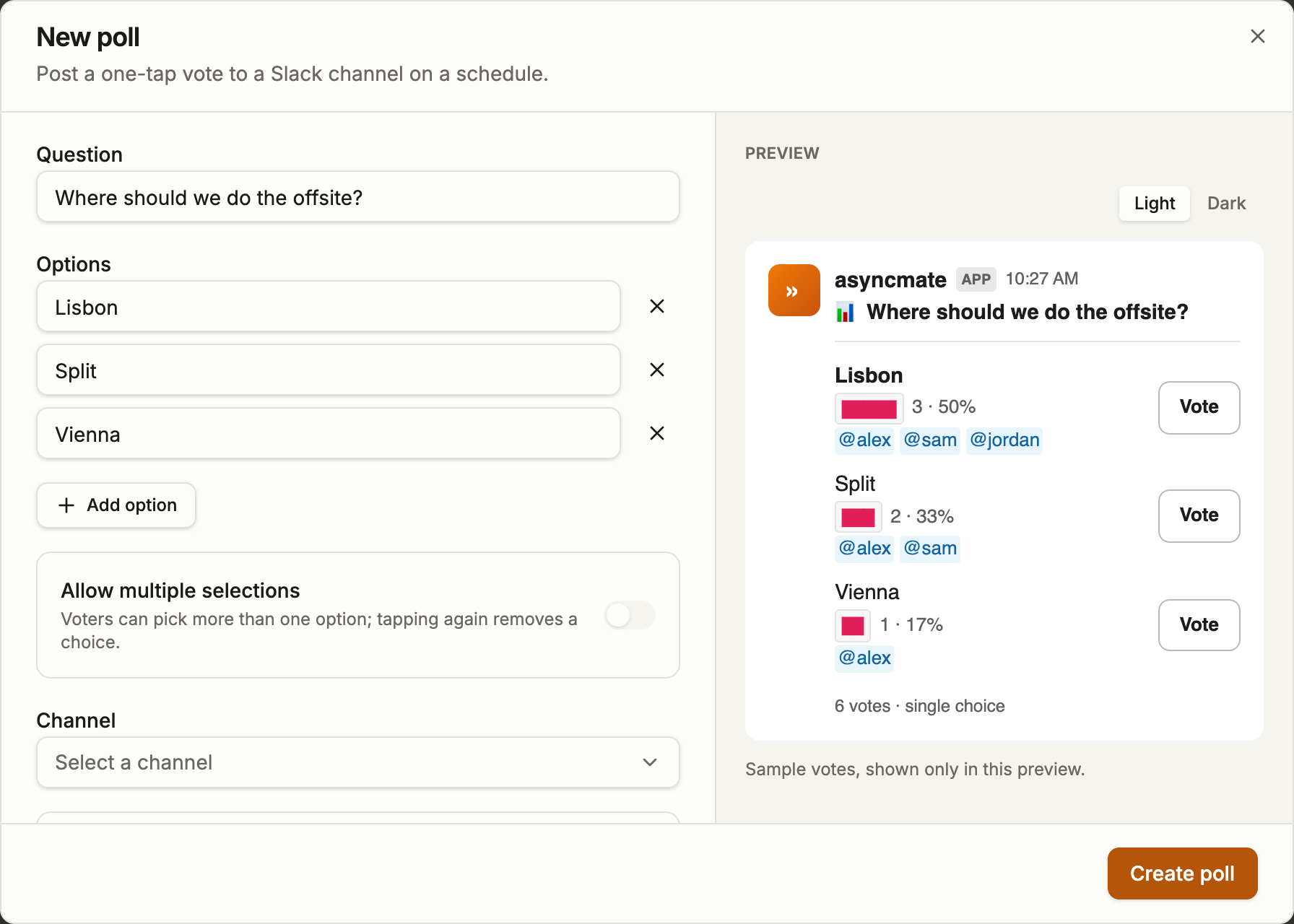
Anonymous polls store no voter identity at all: each vote carries a per-poll-run code instead of a name, and the key that produced the codes is discarded when the poll closes, so there is nothing left to look up afterwards.
For the sensitive questions, anonymous surveys run separately from polls: Survey, eNPS and Weekly Pulse presets, answers never shown next to a name (not even to the owner), and results withheld until at least five people have responded.
Polls are free on every asyncmate plan: no creator licence, no voter cap, and the people voting never appear on the bill. During the beta everything, surveys included, is free until November 1, 2026.
FAQ
Does Slack have a built-in poll feature? No. Slack's own help article points to emoji reactions or a polling app. Workflow Builder can collect answers through a form on paid plans, but nothing native to Slack counts votes or renders a tally.
How do I create a poll in Slack without an app? Post the options with one emoji each and seed the reactions yourself, as in the template above. It is free and instant; the price is public votes, no per-person limit and a count that includes your own seed reactions.
How do I make an anonymous poll in Slack? Not with anything built in: reactions and Workflow Builder forms are both attributed. You need an app with an explicit anonymous mode. Whether that costs money depends on the app: Simple Poll includes anonymity free, Polly sells it from $29/mo. For sensitive topics prefer a survey that withholds results until enough people have answered, because a tally of three anonymous votes is rarely anonymous.
How do I create a vote in Slack? The same ways you create a poll: reactions for a quick show of hands, a polling app when the count has to be fair. If the decision is contested, use an app that enforces one vote per person, or run it as a ranked-choice or dot-voting poll instead of a single-winner tally, and say up front whether the result is binding.
Are Slack polls free? Emoji reactions are free everywhere. Workflow Builder needs a paid Slack plan. Polling apps cap their free tiers by responses per month (Polly at 25, Simple Poll at 100, checked August 2026). asyncmate's polls are free on every plan, with voters never billed.
Can people vote more than once in a Slack poll? With reactions, yes: anyone can react to every option. With a polling app, no: one vote per person, and in asyncmate tapping another option moves your vote rather than adding a second one.