Blog/Anonymous employee surveys in Slack: how to get honest feedback (2026)
Anonymous employee surveys in Slack: how to get honest feedback (2026)
The asyncmate team · Updated September 9, 2026 · 10 min read
Ask "how is everyone doing?" in a channel and you will hear "pretty good" from at least one person who is not doing pretty good. The public answer and the honest answer are different answers, and the gap between them is exactly the information a manager needs most. Anonymous surveys exist to close that gap. They work when the anonymity is real and believed, and they backfire when it is either fake or unnecessary, so this guide covers both halves: when to use one, and how to tell whether a tool's "anonymous" actually holds.
Full disclosure: we make asyncmate, which includes anonymous surveys. The last section explains precisely what it stores and shows, because on this topic vague wording is worse than no feature.
Why people don't say what they think
Feedback in a workplace flows uphill, toward people with some power over the sender's salary, projects and reputation. Even in a healthy team, saying "the workload is unsustainable" to the person who set the workload carries a cost, and the person deciding whether to say it weighs a small chance of improving things against a small chance of being remembered as the complainer. Most people, most of the time, round their answer toward the middle. The research name for the missing ingredient is psychological safety, which Amy Edmondson's research has tied to how much teams learn and how well they perform. An anonymous survey does not create it; it routes around its absence long enough to measure what people are not saying.
Slack sharpens this. A channel message is written, permanent, searchable and signed. Saying something mildly critical in a meeting evaporates; typing it into a channel creates a record with your name on it. So teams that live in Slack develop a particular dialect: everything is "pretty good", workload is "about right", the release "went okay overall". If every pulse check your team has ever run came back reassuringly mediocre, that is not a stable team, that is the dialect.
When an anonymous survey helps
Anonymity is the right tool when the honest answer and the diplomatic answer differ, and the difference is what you need to know:
- Workload and morale. "Too heavy" is a complaint when signed and a data point when counted. Aggregated over a team, it is an early warning you can act on a quarter before the resignation letter.
- eNPS. "How likely are you to recommend us as a place to work?" only measures anything when a 3 cannot be traced to its author.
- Retro and post-incident input. Criticism of a decision usually means criticism of the person in the room who made it. Anonymous collection separates the input from the confrontation.
- Trends over time. A single anonymous run tells you little; the same three questions asked every week tell you when something changed. Trend lines are where anonymous surveys earn their keep.
When anonymity is the wrong choice
- Teams smaller than about five. With three respondents, "anonymous" is arithmetic away from "named": everyone can guess who wrote what, and everyone knows everyone can. Below that size, have conversations instead. A good tool enforces a minimum-response threshold for exactly this reason.
- Anything that needs follow-up. "Someone is blocked on the migration" is not actionable, which is why standups and blocker tracking should be named. Anonymity suits questions you act on in aggregate, not items you need to chase.
- As a substitute for safety. If people will only say true things anonymously, the survey is measuring the actual problem. Use it to surface that finding, not to route around it forever; the goal is a team where less needs to be anonymous next year.
- Interpersonal problems. "Give anonymous feedback about your colleagues" is an invitation to consequence-free score-settling, and the target cannot even respond. Questions should be about work, process and load, not about named people. If something needs to be said about a person, that is a conversation with a manager or HR, not a form.
Anonymity raises honesty and bluntness together. You will occasionally get a response that is more vent than signal. That is part of the price, and it is still usually a better deal than a channel full of "pretty good".
How to run an anonymous survey in Slack
Nothing built into Slack is designed for anonymity. Messages and emoji reactions are signed by definition. A Workflow Builder form can be configured to post responses without the submitter's name, but the workflow still captures who submitted, whoever maintains it can add that variable back at any moment, and respondents have no way to verify any of this. That is a name hidden in the interface, not anonymity, a distinction the checklist below is about. (If what you actually need is a quick vote rather than a survey, that is a different and easier problem: see how to create a poll in Slack. If it is anonymous questions for an all-hands or AMA, see Slack anonymous questions.) That leaves two real routes.
An external form. A Google Form linked in the channel is free and familiar. Two catches: whether it is anonymous depends entirely on the form's settings, since workplace accounts often default to recording the signed-in email address, and the results live outside Slack, so sharing them back is a manual step that reliably gets skipped. If you use one, open the settings and verify what it collects before the first response arrives.
A survey app in Slack. The survey reaches people where they already are, runs on a schedule without anyone remembering to send it, and posts results back where they will be seen. The cost is an install, which usually means an admin's approval, and the need to verify what the app stores, which the next section is for. We compare the main options on exactly that in the best Slack survey apps.
Whichever route you take, one step matters more than the tool: before the first run, tell the team exactly how the anonymity works, in writing. "It's anonymous, trust me" convinces nobody. "Answers are stored without names and nothing is shown until five people respond" is checkable, and checkable is what gets believed.
What "anonymous" has to mean before you trust it
Most tools that say "anonymous" mean "we hide the name in the interface". People work that out quickly, and then they answer like people who have worked it out. Before trusting any tool with sensitive questions, ours included, get answers to five:
- Where does identity live? There is a difference between "the name is stored next to the answer but not displayed" and "the name is never stored". The first is one admin toggle, data export or subpoena away from a very bad day.
- Who can unhide it? If an owner, admin or vendor support request can reveal authorship, the survey is pseudonymous, and your team should be told that word instead.
- What happens on a small run? Three responses from a team of four is a process of elimination, not a dataset. A serious tool withholds results below a minimum count rather than leaving that math to chance.
- Can the setting change after the fact? A survey that can be switched from anonymous to named after answers arrive was never anonymous, it was anonymous so far.
- Does free text give people away anyway? No storage design fixes "as the only person on the Berlin team, I think...". Warn people to leave self-identifying detail out of what they write.
Anonymous employee survey questions
Fewer, identical, structured questions beat long questionnaires. Identical wording every run is what makes the trend line mean something, structured answers (a scale or a choice) are what aggregate into a readable result, and three questions get answered on a phone between meetings where ten get postponed forever. Some proven sets:
Weekly pulse (weekly, end of week):
- How was your week? (scale, 1 to 5)
- How's your workload? (too light / just right / too heavy)
- Anything on your mind? (free text, optional)
eNPS (monthly to quarterly):
- How likely are you to recommend us as a place to work? (scale, 0 to 10)
- What's the main reason for your score? (free text)
Team survey (every couple of weeks, for a specific topic):
- How are you feeling about work lately? (scale, 1 to 5)
- What's one thing we could improve? (free text)
One rule above all: do not ask a question you are not prepared to act on. Asking about workload and then changing nothing teaches the team the survey is decorative, and response rates record that lesson within a month.
What to do with the results
The survey is the cheap half. What the team watches is what happens next:
- Share the aggregates back within days, especially when they are unflattering. A survey whose results vanish upward confirms every suspicion that made people guarded in the first place.
- Name one change. "Workload trended 'too heavy' for three weeks, so we are cutting scope on X" does more for next month's response rate than any reminder. One visible action beats five promised ones.
- Never speculate about authors. Not out loud, not in DMs, not as a joke. One story about a manager who worked out who wrote something ends honest answers in that company for years.
- Watch trends, not runs. A single bad week is noise; three declining weeks are a signal. Resist reacting to every dip, or people learn that a low score triggers drama.
- Read the response rate as data. Falling participation is itself an answer, usually to the question "does filling this in change anything?"
How asyncmate anonymous surveys work
An anonymous survey in asyncmate is a check-in: create one, pick the Survey, eNPS or Weekly Pulse preset, and turn on Anonymous responses (the eNPS preset turns it on for you). It then DMs the questions on your schedule exactly like a standup.
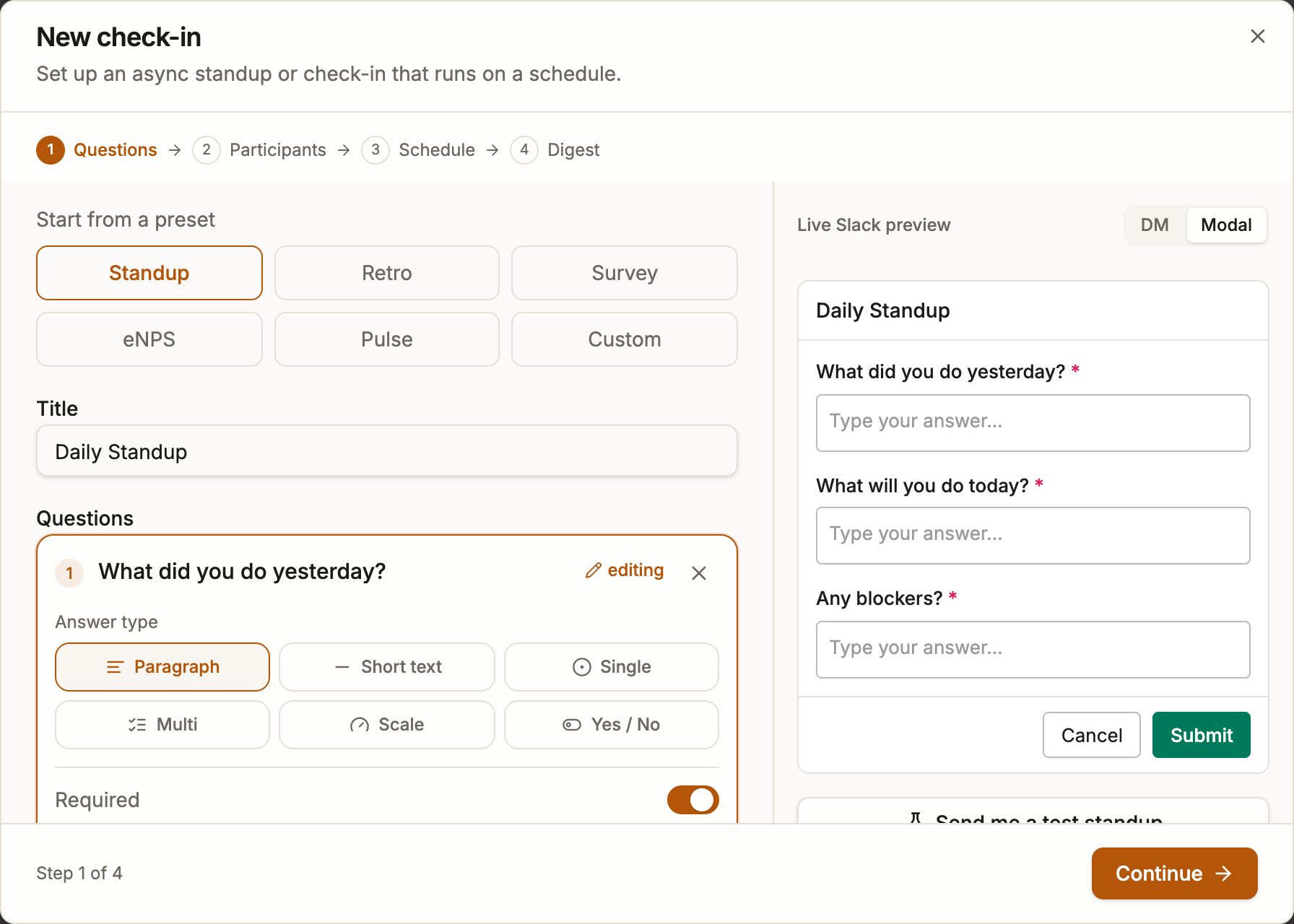
Here is precisely what gets stored, since that is the part marketing pages usually blur. An anonymous answer is saved under a one-way code instead of a Slack id, computed from a random key that exists only while the run is open and is deleted the moment the run closes. Separately, asyncmate does keep a delivery record under your real Slack id, recording that you were sent the survey and whether you submitted, skipped or snoozed it; that record exists so reminders and early closing work, and it contains no answers. Measured against the checklist above:
| The checklist question | asyncmate's answer |
|---|---|
| Where does identity live? | Not next to the answers. There is no name column; only the delivery record (sent, answered, skipped) carries your real Slack id, and it holds no answers. |
| Who can unhide it? | Nobody. No screen, export or admin toggle shows authorship, and once the run closes the key needed to reconstruct it no longer exists, for us included. |
| What happens on a small run? | Below five responses nothing is shown at all: digest, results view and export all withhold the run. |
| Can the setting change later? | No. Anonymity locks once a survey has responses. |
| Does free text give people away? | It can. Free-text answers are listed unattributed and deliberately not in submission order, and the results view repeats the self-identification warning right next to them. |
What the team sees: the digest posted back to the channel shows the response count and aggregates of the structured questions, an average for scales and a count per option for choices. It never shows individual answers and never lists who answered or who did not; anonymous digests have no "no response from" line. The dashboard adds a Survey results view with the same aggregates as trends across runs, and the CSV export follows the same rule. One more deliberate strictness: the AI digest never runs on anonymous surveys, since the summary pipeline works with names and is skipped entirely rather than trusted to be careful.
Anonymous responses are part of Pro, like anonymous polls; the full feature rundown is on the anonymous Slack surveys page. During the beta everything is free until November 1, 2026.
FAQ
Are Slack messages or Workflow Builder forms anonymous? No. Messages and reactions are signed, and a Workflow Builder form still captures who submitted it even when the message it posts omits the name, so that is hiding, not anonymity. Anonymity requires either an external form configured correctly or an app that stores answers without identity.
How many people do you need for an anonymous survey? Five respondents is a sensible floor, and asyncmate enforces it: below five responses no results are shown anywhere. With fewer people, answers can be worked out by elimination, and everyone answering knows it.
Can a workspace admin see who wrote an answer? In asyncmate, no. Answers are stored under a one-way per-run code whose key is deleted when the run closes, so there is nothing to look up, and no admin view or export shows authorship. What is stored under your name is only delivery state: that you received the survey and whether you responded.
Are Google Forms anonymous? Only if configured that way. Workplace Google accounts often default to recording the signed-in email address, and a form can require sign-in without making that obvious to respondents. Check the form's settings before the first answer, not after.
How often should you run a pulse survey? Weekly or fortnightly for a short pulse, monthly to quarterly for eNPS. More often than weekly produces survey fatigue and click-through answers, which look like data and are not.