Blog/How to run a survey in Slack: Workflow Builder, a form link, or a survey app
How to run a survey in Slack: Workflow Builder, a form link, or a survey app
The asyncmate team · November 11, 2026 · 10 min read
A Slack survey is a set of questions sent to specific people, with answers that are read in aggregate and are often anonymous. Slack has no survey feature, so running one means picking one of three routes: a Workflow Builder form, a link to an external form such as Google Forms, or a survey app that asks the questions in a DM. Workflow Builder is the right call when names on the answers are fine and you already pay for Slack. A form link is the free option for a one-off. An app is what you need when the survey repeats or has to be anonymous.
Full disclosure: we make asyncmate, which is one of the apps in route three. Routes one and two need nothing from us, and for plenty of surveys they are enough.
Two decisions that pick the route for you
Would the answers change if they were anonymous? "Which day suits the offsite" gets the same answer either way. "How is your workload" does not. Nothing built into Slack is anonymous: messages, reactions and Workflow Builder forms all record who sent them. If the honest answer needs protection, you are choosing between a carefully configured external form and an app with a real anonymous mode.
Is it one survey, or the same survey every week? A one-off tolerates manual work: you post the link, remind people, and paste the results back. A weekly pulse does not, because the reminding and the collecting are the parts that quietly stop happening by week four.
| Route | Cost | Anonymous | Recurring | Results |
|---|---|---|---|---|
| Workflow Builder form | Included in paid Slack plans | No | Yes, on a schedule | A channel message or spreadsheet row per answer |
| External form link | Free with Google Forms | Depends on the form settings | No, you repost it | In the form tool, outside Slack |
| Survey app | Free tiers, then per licence or per person | Yes, in the apps that offer it | Yes | A results view, with aggregates |
If you have a single question with a handful of options, that is a poll, and how to create a poll in Slack is the shorter read.
Route 1: a Workflow Builder form
Workflow Builder is Slack's own automation tool, included in paid plans and missing from the free one. A workflow can show people a form and send what they typed somewhere useful.
- On desktop, click Agents & tools in the sidebar (in some workspaces the tab is called Tools, and it may sit under More). Under Workflows, click New, then Build Workflow. Slack's help article has the screens.
- Choose how it starts. From a link gives you a link to post in a channel; people click it and the form opens. On a schedule runs it at a date, time and cadence you set.
- Add the step Collect info in a form and write your questions. Text answers and dropdowns cover most surveys.
- Add a step for the answers: Send a message to a private channel with the responses inserted, or a Google Sheets step that adds each response as a row.
- Publish, then post the link in the team channel with a line about what it is for.
One thing the scheduled version cannot do is open a form by itself. In Slack a form opens in response to someone's click, a rule its developer documentation spells out, so a scheduled workflow first posts a message with a button, and the form opens for whoever presses it.
What you get is collection, not a survey tool. Answers arrive one at a time with nothing counting them, so a 30-person pulse is 30 rows that somebody still has to summarize. Slack lets you download the form responses as a file, which helps with the counting and nothing else. And it is not anonymous: the workflow knows who submitted each form even if the message it posts leaves the name out, and whoever maintains the workflow can add the name back at any time. Your team has no way to check which version is running.
- Best for: structured questions where names are fine, such as planning input, event logistics or a weekly written update.
- Cost: included in paid Slack plans.
- Weak spot: no anonymity, no tally, no reminders for people who have not answered.
Route 2: a link to an external form
A Google Form posted in a channel is free on every Slack plan and everyone already knows how to fill one in. Build the form, copy the link, and post it with a deadline:
Quick survey: how did the Q4 planning process go?
Five questions, about two minutes. It closes Friday at 5 PM.
No email addresses are collected. I'll share the results in this channel on Monday.
[link to the form]
Copy that and change the details. The three promises in it (how long, when it closes, when results come back) do more for the response rate than any tool choice.
Check one setting before you post. In the form's Settings, under Responses, Collect email addresses has to be set to Do not collect. Google's help page says a new form does not collect addresses by default, but a copied form or a template can carry a different setting, and the Verified option records the respondent's Google account without them typing anything. A form that says "anonymous" at the top while recording every address is worse than a named survey.
The weak points are all about Slack being somewhere else. Nothing reminds the people who have not answered, the results live in a different tool, and sharing them back is a manual step. If you want new responses to appear in a channel, Google Forms needs a connector such as Zapier to do it; SurveyMonkey ships its own Slack integration that posts each response as it arrives. That keeps you informed, though it also puts individual answers in a channel, which defeats an anonymous survey.
- Best for: a one-off survey to a large group, or any team on the free Slack plan.
- Cost: free.
- Weak spot: no reminders, results outside Slack, and anonymity that rests on a setting nobody can see.
Route 3: a Slack survey app
A survey app does the parts the first two routes leave to you. It sends each person the questions in a DM, on a schedule, reminds the ones who have not answered, and shows the results as counts and averages instead of a pile of rows. The ones worth considering also offer an anonymous mode.
The setup is nearly the same in every app:
- Install the app from the Slack Marketplace. In most companies that needs an admin's approval, so ask early.
- Create a survey and add the questions, or start from a template such as eNPS or a weekly pulse.
- Choose who receives it: named people, or everyone in a channel.
- Set the schedule (once, weekly, quarterly) and how long people have to answer.
- Decide whether it is anonymous before the first run, and tell the team which it is.
Where the apps differ is in what "anonymous" means and who ends up on the bill. Polly sells anonymous responses on its $29 a month licence, charged per person who creates surveys. Geekbot includes anonymous surveys on every tier and charges $1 a month for each respondent. Simple Poll keeps multi-question surveys on its paid plan, priced for the whole workspace. Those numbers are from each vendor's pricing page, checked in November 2026, and our comparison of the best Slack survey apps goes through all of them with the trade-offs.
- Best for: recurring surveys, and any survey where the honest answer needs anonymity.
- Cost: free tiers are narrow; paid plans run from a few dollars per person to a flat workspace price.
- Weak spot: an install, usually an approval, and anonymity you have to verify per vendor.
Running the survey with asyncmate
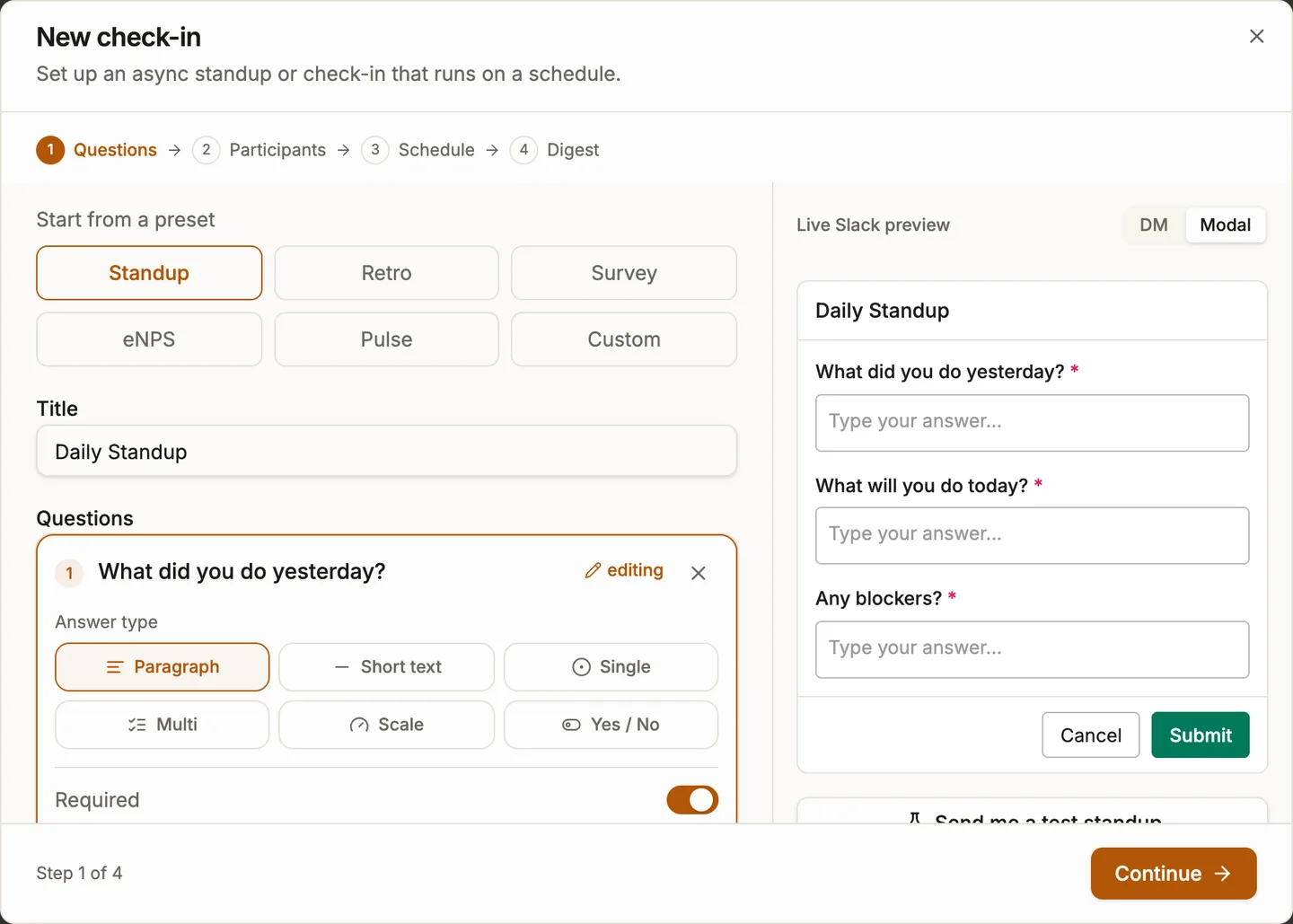
asyncmate is a standup bot, and its surveys run on the same engine as its standups: the bot DMs the questions on a schedule and collects the answers.
- In the dashboard, click New check-in and pick the Survey, eNPS or Weekly Pulse preset. Each comes with questions you can edit. Weekly Pulse, for example, asks "How was your week?" on a 1 to 5 scale, "How's your workload?" with three options, and one open question.
- Choose the participants, by name or by pulling in the members of a channel.
- Set the schedule and the response window.
- Turn on anonymous answers if the questions call for it. This locks once the first answers arrive, so nobody can switch a running survey to named.
An anonymous answer is stored against a one-way code for that run, not against a person, and the key that produced the codes is deleted when the run closes. Results appear in a protected Survey results view in the dashboard, not in a channel, and they stay hidden until at least five people have responded. Free-text answers are listed without names and out of submission order. The anonymous Slack surveys page has the full detail on what is stored.
Two limits, stated plainly. asyncmate is not a survey platform: there is no branching logic, no benchmark data and no HR analytics, so a people team running a company-wide engagement program will want Polly or an HR tool. And anonymous surveys are a Pro feature. The free plan covers 10 people who answer, Pro is $2.50 a month per person who answers, and people who receive a survey and ignore it are never billed. Everything is free during the launch offer until December 31, 2026.
Getting people to answer
The route matters less than these habits, and they apply to all three.
Keep it to three to five questions. Every extra question costs you respondents, and the last question on a long survey gets the least thoughtful answers. If you need twenty questions, you need a quarterly survey and a different tool.
Say how the anonymity works before the first run. "This is anonymous" convinces nobody. "Answers are stored without names and I see nothing until five people respond" is something a person can evaluate. Our guide to anonymous employee surveys in Slack covers when anonymity helps and when it backfires.
Do not survey a team of three anonymously. Everyone can work out who said what by elimination. Below about five people, have the conversation instead.
Close the loop in the same channel. Post what you learned and one thing that will change because of it. A survey whose results vanish teaches the team that answering is pointless, and the next response rate shows it.
Remind once, then stop. One nudge the day before it closes is reasonable. Three is how a survey becomes the thing people mute.
Which route should you choose?
Names are fine and you are on a paid Slack plan. Workflow Builder. It costs nothing extra and needs no approval.
It is a one-off, or you are on free Slack. A Google Form link, with email collection switched off if you promised anonymity.
It repeats, and you want the results counted for you. A survey app with scheduling.
The honest answer needs anonymity. A survey app whose anonymous mode does not store names and withholds small result sets. Ask the vendor whether an admin can see who said what.
It is really one question. A poll, not a survey.
FAQ
Does Slack have a built-in survey tool? No. Slack's own options are emoji reactions for a quick vote and Workflow Builder forms on paid plans, which collect answers but do not count them and are never anonymous. Everything else is an installed app or an external form.
How do I create a survey in Slack for free? Post a Google Form link in a channel, which works on every Slack plan. If you already pay for Slack, a Workflow Builder form is also free to you. Survey apps have free tiers too, though most keep multi-question or anonymous surveys on a paid plan.
Can a Slack survey be anonymous? Not with anything built in. A Workflow Builder form records who submitted it, even if the posted message hides the name. An external form can be anonymous if email collection is off. Among apps, check whether names are hidden in the interface or never stored, and whether results are withheld when only a few people have answered.
How do I send survey responses to a Slack channel? In Workflow Builder, add a Send a message step after the form and insert the responses. SurveyMonkey has a Slack integration that posts each new response. Google Forms needs a connector such as Zapier. Avoid all of these for an anonymous survey, because individual answers in a channel are easy to match to people.
What is the difference between a poll and a survey in Slack? A poll is one question with a tally everyone can see, usually posted in a channel. A survey is several questions sent to specific people, with answers that are private or anonymous and results that are read in aggregate.
How often should a team run a survey? A short pulse works weekly or every two weeks, and eNPS is usually quarterly. Asking more often than you can act on the answers trains people to click through without reading.